
I need to create a table with rounded and rectangular borders.
The table with round and rectangular borders should look like this:
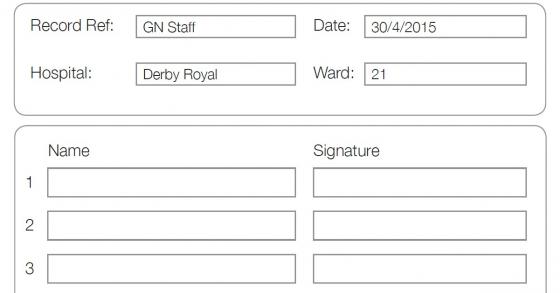
Can anyone explain how I would start creating such a table?
Posted on StackOverflow on Jul 9, 2015 by Md. Asaduzzaman
Please take a look at the NestedTableRoundedBorder example. It creates a PDF that looks like this: nested_table_rounded_border.pdf
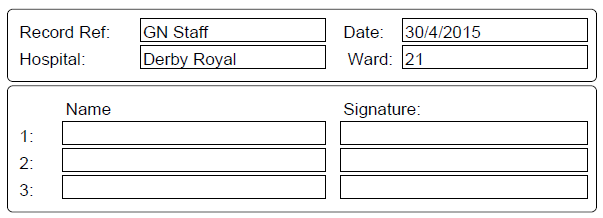
This construction consists of nested tables. The outer table only has one column, but we use it to create the rounded corners:
private class RoundedBorderCellRenderer extends CellRenderer {
    public RoundedBorderCellRenderer(Cell modelElement) {
        super(modelElement);
    }

    @Override
    public void draw(DrawContext drawContext) {
        drawContext.getCanvas().roundRectangle(getOccupiedAreaBBox().getX() + 1.5f, getOccupiedAreaBBox().getY() + 1.5f,
                getOccupiedAreaBBox().getWidth() - 3, getOccupiedAreaBBox().getHeight() - 3, 4);
        drawContext.getCanvas().stroke();
        super.draw(drawContext);
    }
}
This renderer is used like this:
cell = new Cell().add(innertable);
cell.setNextRenderer(new RoundedBorderCellRenderer(cell));
cell.setBorder(Border.NO_BORDER);
cell.setPadding(8);
outertable.addCell(cell);
The inner tables are used to create cells with or without borders, for instance like this:
// inner table 1
Table innertable = new Table(new float[]{8, 12, 1, 4, 12});
innertable.setWidthPercent(100);
// first row
// column 1
cell = new Cell().add("Record Ref:");
cell.setBorder(Border.NO_BORDER);
innertable.addCell(cell);
// column 2
cell = new Cell().add("GN Staff");
cell.setPaddingLeft(2);
innertable.addCell(cell);
// column 3
cell = new Cell();
cell.setBorder(Border.NO_BORDER);
innertable.addCell(cell);
// column 4
cell = new Cell().add("Date: ");
cell.setBorder(Border.NO_BORDER);
innertable.addCell(cell);
// column 5
cell = new Cell().add("30/4/2015");
cell.setPaddingLeft(2);
innertable.addCell(cell);
// spacing
cell = new Cell(1, 5);
cell.setHeight(3);
cell.setBorder(Border.NO_BORDER);
innertable.addCell(cell);
If some of the dimensions are quite like you want, it's sufficient to change parameters such as the widths array, the padding, the fixed height, etc.
Click How to create a table with complex borders? | iText 5 PDF Development Guide if you want to see how to answer this question in iText 5.