
How can I create a hierarchical bookmark structure in PDF using iText?
I have data in ArrayList like below :
ArrayList tree = new ArrayList();
tree.add(getDTO(1,"Root",0));
tree.add(getDTO(239,"Node-1",1));
tree.add(getDTO(242,"Node-2",239));
tree.add(getDTO(243,"Node-3",239));
tree.add(getDTO(244,"Node-4",242));
tree.add(getDTO(245,"Node-5",243));
I am able to display above data in tree structure like below :
Root
-----Node-1
------------Node-2
------------------Node-4
------------Node-3
------------------Node-5
How can I create a hierarchical bookmark structure (as shown above) in PDF using iText?
Posted on StackOverflow on Feb 26, 2015 by Butani Vijay
In PDF terminology, bookmarks are referred to as outlines. Please take a look at the CreateOutlineTree example to find out how to create an outline tree as shown in this PDF:
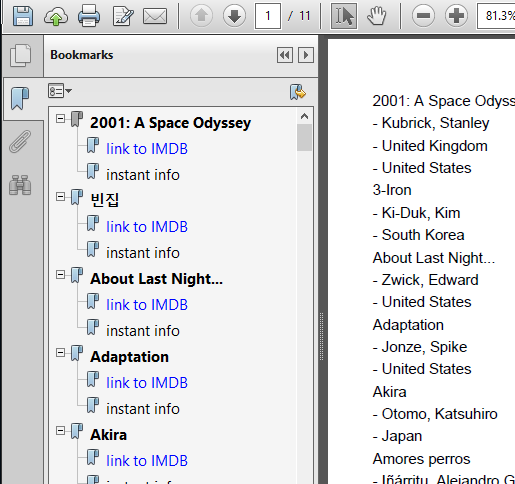
We start with the root of the tree:
PdfOutline root = pdfDoc.getOutlines(false);
Then we add a branch:
PdfOutline movieBookmark = root.addOutline(title);
        movieBookmark.addAction(PdfAction.createGoTo(
                PdfExplicitDestination.createFitH(pdfDoc.getLastPage(),
                        pdfDoc.getLastPage().getPageSize().getTop())));
To this branch, we add a leaf:
PdfOutline link = movieBookmark.addOutline("link to IMDB");
link.addAction(PdfAction.createURI((String.format(RESOURCE, movie.getImdb()))));
And so on.
The key is to use PdfOutline and to pass the parent outline as a parameter when constructing a child outline.
Can I do this in an existing pdf? I mean without creating new PDF, I want to add bookmarks to an existing pdf.
As it is shown above, iText 7 has an intuitive algorithm of adding outlines, no matter do you work with an existing document or create a new one. The depth of the bookmarks can be set to any desired value too. Here is a list of a few simple steps to solve your problem:
-
Create a list with bookmarks:
PdfOutline calendar = pdfDoc.getOutlines(false);
-
Set title:
calendar.setTitle("Calendar");
-
Add a new outline to the existing one:
PdfOutline date = calendar.addOutline("2011-10-12");
-
Repeat:
PdfOutline day = date.addOutline("Monday");
PdfOutline hour = day.addOutline("10 AM");
//and so on…
Take a note that the addOutline() method can take different input arguments:
-
addOutline(PdfOutline outline) -
addOutline(String title) -
PdfOutline addOutline(String title, int position)
You can also add an action using addAction() (see CreateOutlineTree or BookmarkedTimeTable example).
Click How to create hierarchical bookmarks? | iText 5 PDF Development Guide if you want to see how to answer this question in iText 5.