
I am trying to set border colors of table cells. No matter what I try, the border color is not changing - it's always black! What am I doing wrong?
Here's my test code. cell1 should have a red top border and a blue bottom border:
PdfPTable table =new PdfPTable(2);
PdfPCell cell1 =new PdfPCell(new Phrase("Cell 1"));
cell1.setBorderColorTop(new BaseColor(255, 0, 0));
cell1.setBorderColorBottom(BaseColor.BLUE);
table.addCell(cell1);
PdfPCell cell2 =new PdfPCell(new Phrase("Cell 2"));
table.addCell(cell2);
Question posted on StackOverflow on Jan 29, 2016 by Naresh
Please take a look at the ColoredBorder example. It shows the solutions of your problem.
Here is a short piece of code that shows how to create a cell with different borders in iText 7:
PdfDocument pdfDoc = new PdfDocument(new PdfWriter(dest));
Document doc = new Document(pdfDoc);
Table table;
table = new Table(2);
Cell cell;
cell = new Cell().add("Cell 1");
cell.setBorderTop(new SolidBorder(Color.RED, 1));
cell.setBorderBottom(new SolidBorder(Color.BLUE, 1));
table.addCell(cell);
cell = new Cell().add("Cell 2");
table.addCell(cell);
doc.add(table);
doc.close();
The result looks like this:
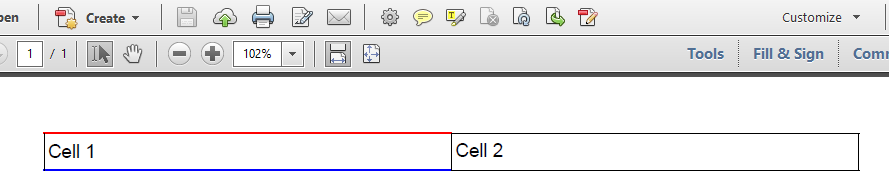
Note that SolidBorder constructor has two parameters: the color and the width. You can chose any type of border you need: DashedBorder, DottedBorder, DoubleBorder, GrooveBorder, InsetBorder, OutsetBorder, RidgeBorder, RoundDotsBorder.
Click How do I change the border color of a PdfPCell? | iText 5 PDF Development Guide if you want to see how to answer this question in iText 5.