
Is it possible to create numbered lists without any indentation?
Something like:
1 A 1-1 A_A 2 B 2-1 B_B 2-1-1 B_B_B
Posted on StackOverflow on
Oct 22, 2015
by
Valeriane
In iText 7 we create an ordered list like this:
List list1 = new List(ListNumberingType.DECIMAL); list1.setItemStartIndex(8); for (int i = 0; i
We get a result like this:
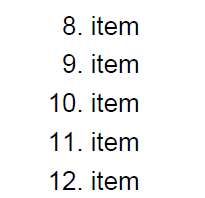
List without indentation
As you see no extra space is added between the label and the content of a list item by default in iText 7. Your question is: how can we remove this indentation. So at first I will show, how we can receive the list with indentation. That's a matter of adding a single line to your code:
List list2 = new List(ListNumberingType.DECIMAL); list2.setListSymbolAlignment(ListSymbolAlignment.LEFT); list2.setItemStartIndex(8); for (int i = 0; i
Now the result looks like this:
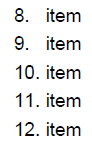
List with indentation
As you can see, extra space was added after items 8 and 9. So to have list without indentation you should just remove line: list2.setListSymbolAlignment(ListSymbolAlignment.LEFT);
or change the alignment to RIGHT
list2.setListSymbolAlignment(ListSymbolAlignment.RIGHT);
Also you can change the indentation by using setSymbolIndent(float symbolIndent). But take into account that it will change the indentation for all elements (from 8 till 12).
There is also useful information:
-
Custom numbering: no
.after the number. -
A nested structure: 2, followed by 2_1, and so on.
Changing the list symbol in case of ordered lists can be done using the setPreSymbolText() and setPostSymbolText() methods.
Take a look at this snippet:
List list3 = new List(ListNumberingType.DECIMAL); list3.setItemStartIndex(8); list3.setPostSymbolText(" "); for (int i = 0; i
First we remove the dot that is added after each number automatically, we use the getPostSymbolText() method for this:
list3.setPostSymbolText(" ");
Then we nest list inside list3, using ListItem of list3. As we want to get a result that looks like 8_1, 8_2, 9_1, etc., we use the setPreSymbolText() method like this:
list.setPreSymbolText(String.valueOf(8 + i) + "_");
Now the result looks like this:
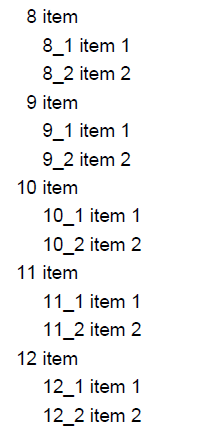
Using pre- and post-symbol
If you're creating Tagged PDF, it's better to use List because iText will then automatically tag that content as a list (e.g. in the context of accessibility).
Click How to create a list without indentation? | iText 5 PDF Development Guide if you want to see how to answer this question in iText 5.