
I know that iText can generate tagged PDF documents from scratch, but is it possible to insert alternative text for images in an existing tagged PDF without changing anything else? I need to implement this feature in a program without using GUI applications such as Adobe Acrobat Pro.
Posted on StackOverflow on Dec 2, 2015 by tsforsure
Please take a look at the AddAltTags example.
In this example, we take a PDF with images of a fox and a dog where the Alt keys are missing: no_alt_attribute.pdf
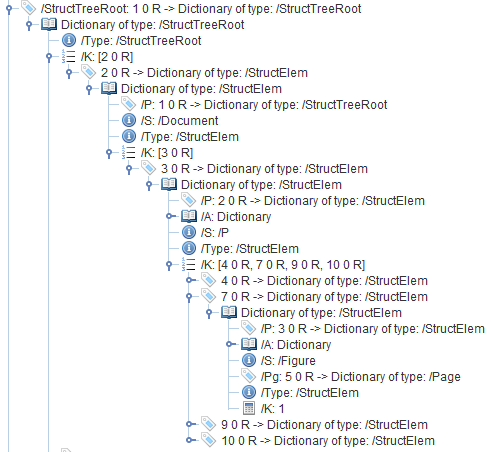
Code can't recognize a fox or a dog, so we create a new document with Alt attributes saying "Figure without an Alt description": added_alt_attributes.pdf)

We add this description by walking through the structure tree, looking for structural elements marked as /Figure elements:
public void manipulatePdf(String dest) throws IOException {
  PdfDocument pdfDoc = new PdfDocument(new PdfReader(SRC), new PdfWriter(dest));
  PdfDictionary catalog = pdfDoc.getCatalog().getPdfObject();

  // Gets the root dictionary
  PdfDictionary structTreeRoot = catalog.getAsDictionary(PdfName.StructTreeRoot);
  manipulate(structTreeRoot);

  pdfDoc.close();
}

public void manipulate(PdfDictionary element) {
  if (element == null) {
    return;
  }

  // If an element is a figure, adds an /Alt entry.
  if (PdfName.Figure.equals(element.get(PdfName.S))) {
    element.put(PdfName.Alt, new PdfString("Figure without an Alt description"));
  }

  PdfArray kids = element.getAsArray(PdfName.K);

  if (kids == null) {
    return;
  }

  // Loops over all the kids
  for (int i = 0; i < kids.size(); i++) {
    manipulate(kids.getAsDictionary(i));
  }
}
You can easily port this Java example to C#:
-
Get the root dictionary from the
PdfDocumentobject, -
Get the root of the structure tree (a dictionary),
-
Loop over all the kids of every branch of that tree,
-
When a lead is a figure, add an
/Altentry.
Click this link if you want to see how to answer this question in iText 5.