
The problem is that the chart image is too big for the cell.
I am inserting some jpg charts inside my PDF. These charts look like this:

I insert it into a table of my PDF in this way:
vulnerabilityDetailsTable.AddCell(new PdfPCell(img) {
  Border = PdfPCell.RIGHT_BORDER, BorderColor = new BaseColor(79, 129, 189), BorderWidth = 1, Padding = 5, MinimumHeight = 30, PaddingTop = 10
});
}
The problem is that the chart image is too big for the cell and I obtain this horrible result:
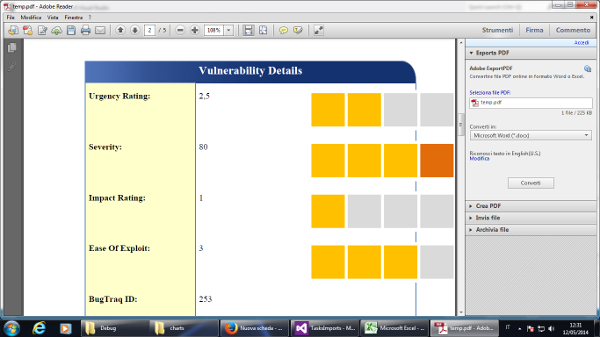
So I have the following 2 questions:
-
Can I resize the
Imagesize into my code or do I have to do this with an image editor? If it's possible, where do have I to do this? Right after I load the image or when I put the image into my PDF table cell? -
When I look at the image using my Windows Photo Viewer at 100% of the size, I see it much smaller than in the PDF. Why is this?
Posted on StackOverflow on Mar 12, 2014 by Andrea Nobili
As documented, this option doesn't scale the image (which is what you want). If you want to scale the image, you could use this:
Cell cell = new Cell();
cell.add(img[0].setAutoScale(true));
table.addCell(cell);
By adding the boolean parameter true, you ask iText to scale the image. My code is written in Java, but it won't take much time to port it to C#. Just replace the lower case with the upper while using methods.
Another option is to use addCell() like this:
table.addCell(img[0]);
This will also scale the image, but use the properties of the default cell. If you don't change these properties, there will be a padding of 2 user units.
You can also change the width percentage of the image, for instance:
cell.add(img[0].setWidthPercent(50));
This line will make sure that the width of the image is 50% of the available width of the cell.

Click How to resize an Image to fit it into a PdfPCell? | iText 5 PDF Development Guide if you want to see how to answer this question in iText 5.