
This article explains how to use iText Core's font style simulation, simulateBold() (Java/.NET) and simulateItalic() (Java/.NET), to approximate a bold or italic style when a document requests a font variant that does not exist as a separate physical font file.
It also covers the Text (Java/.NET), Paragraph (Java/.NET), Canvas (Java/.NET), and PdfCanvas (Java/.NET) building blocks used to apply and wrap that styling.
Overview
A source document may request a font family together with a style that does not exist as a separate physical font face.
For example, a document may specify:
Font family: Calibri Light
Bold: true
However, the available font collection may contain Calibri Light without a corresponding Calibri Light Bold font file.
This situation commonly occurs when processing:
-
SVG Content
-
HTML or CSS
-
XML-based document formats
-
Office documents (e.g. content authored in Word or PowerPoint and converted to PDF)
When the requested font variant is unavailable, the rendering application must decide how to represent the requested formatting.
iText provides simulateBold() and simulateItalic() through its Layout API to let an application preserve the available base font while approximating a missing bold or italic style. They are available through iText layout elements such as Text and Paragraph.
This article demonstrates two ways to use these methods:
-
Apply the style directly to a
TextorParagraph. -
Use the Layout API in an existing
PdfCanvasworkflow by wrapping thePdfCanvaswith a LayoutCanvas.
The problem addressed by this article is:
How can an application preserve an available base font and approximate a requested bold or italic style when the corresponding physical font variant does not exist?
Recommended font-resolution strategy
Font simulation should be used as part of an explicit fallback strategy.
Use the following order:
-
Use the exact requested font face when it exists.
-
When the exact styled face is unavailable, check whether the base font exists.
-
If the base font exists, use it with
simulateBold()orsimulateItalic().
For example:
Calibri Light + Bold requested
              |
Calibri Light Bold available?
              |
             No
              |
Calibri Light available?
              |
             Yes
              |
Use Calibri Light with simulateBold()
Apply styles directly with the Layout API
When an application already uses iText’s Layout API, the style can be applied directly to a Text element.
Simulated Bold:
Text text = new Text("Simulated bold")
        .setFont(font)
        .setFontSize(12)
        .simulateBold();
Simulated Italic:
Text text = new Text("Simulated italic")
        .setFont(font)
        .setFontSize(12)
        .simulateItalic();
Simulated Bold and Italic:
Text text = new Text("Simulated bold and italic")
        .setFont(font)
        .setFontSize(12)
        .simulateBold()
        .simulateItalic();
Underline:
Text text = new Text("Underlined text")
        .setFont(font)
        .setFontSize(12)
        .setUnderline();
Line-through:
Text text = new Text("Line-through text")
        .setFont(font)
        .setFontSize(12)
        .setLineThrough();
Text and Paragraph elements can also take setUnderline() (Java/.NET) and setLineThrough() (Java/.NET), and are applied the same way. They are shown here for completeness as they can be combined with simulateBold()/simulateItalic().
However, unlike font style simulation, these are not approximations of a missing style: they draw an actual vector line in the content stream regardless of which font is in use, so there is no "real" underline being approximated.
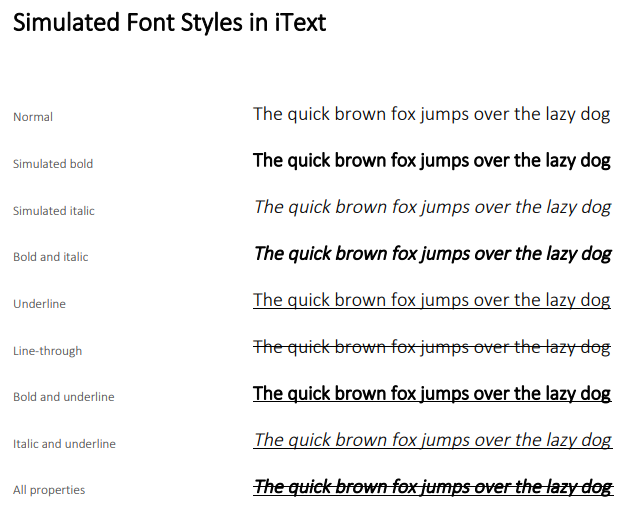
🔹 A simulated style can also be applied to a Paragraph when the entire paragraph should inherit the same formatting.
Paragraph paragraph = new Paragraph("Simulated bold paragraph")
        .setFont(font)
        .setFontSize(12)
        .simulateBold();
🔹 For mixed formatting, apply the properties to individual Text elements:
Paragraph paragraph = new Paragraph()
        .setFont(font)
        .setFontSize(12)
        .add(new Text("Normal text, "))
        .add(new Text("simulated bold").simulateBold())
        .add(new Text(", simulated italic").simulateItalic())
        .add(new Text(", and both")
                .simulateBold()
                .simulateItalic());

Paragraph.
Use styles in an existing PdfCanvas workflow
PdfCanvas does not directly expose simulateBold() or simulateItalic() because those methods belong to the higher-level Layout API rather than the low-level kernel API.
An application does not need to replace its entire rendering pipeline to use them. Instead, it can wrap the existing PdfCanvas with a Layout Canvas and use the wrapper only for text requiring layout-level simulated styling.
For example:
PdfCanvas pdfCanvas = new PdfCanvas(page);

try (Canvas textCanvas =
             new Canvas(pdfCanvas, page.getPageSize())) {
    Text text = new Text(value)
            .setFont(font)
            .setFontSize(fontSize);
    if (bold) {
        text.simulateBold();
    }
    if (italic) {
        text.simulateItalic();
    }
    textCanvas.showTextAligned(
            new Paragraph(text)
                    .setMargin(0)
                    .setPadding(0),
            x,
            y,
            TextAlignment.LEFT,
            VerticalAlignment.BOTTOM
    );
}
The Layout Canvas is designed for adding layout content directly to a specified PdfCanvas. The constructor accepts the low-level canvas and the rectangular area available for layout.
Mixing PdfCanvas and Layout Canvas
A rendering pipeline may draw table geometry using PdfCanvas:
PdfCanvas pdfCanvas = new PdfCanvas(page);

pdfCanvas.rectangle(x, y, width, height)
        .stroke();
It can then use the same underlying content stream to render styled text:
try (Canvas textCanvas =
             new Canvas(pdfCanvas, page.getPageSize())) {

    Text text = new Text(value)
            .setFont(font)
            .setFontSize(fontSize)
            .simulateBold();
    textCanvas.showTextAligned(
            new Paragraph(text)
                    .setMargin(0)
                    .setPadding(0),
            textX,
            textY,
            TextAlignment.LEFT,
            VerticalAlignment.BOTTOM
    );
}
This allows an application to introduce simulated styles without redesigning the rest of its graphics rendering architecture.
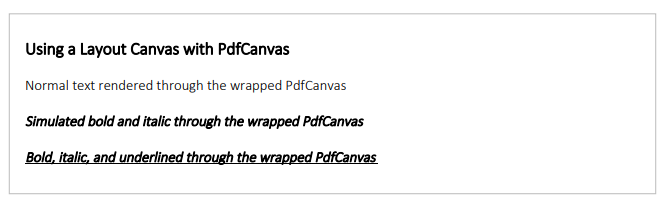
PdfCanvas.
Example
The screenshots above were taken from this example document:
Notes and Limitations
-
Where possible, you should use a genuine bold or italic font file. Simulation exists for cases where no such file exists - it should not be a substitute for genuine font styles.
-
Simulated styles are most noticeable at small font sizes, in print, and viewing at high zoom levels.
-
Simulation reuses the original glyph outlines, so operations such as copy-paste and text extraction behave normally. This is an advantage over alternatives such as rasterizing text.