
Background
Release 7.2.5 of the iText Core library introduced a fix in relation to how word wrapping is handled.
In borderline cases, for example when text elements contained in a Paragraph have a single character space at the beginning or end of lines, older versions of iText would fail to break/wrap appropriately.
Example Code:
As a highlighted example, below is a snippet of iText code to create a simple Text element contained in a Paragraph.
Java
public class TextWrapTest {
    public static void main(String[] args) throws IOException{
        LicenseKey.loadLicenseFile(new FileInputStream("license/license.json"));
        String fileName = "target/testTextWrapping_New.pdf";
        testTextWrapping(fileName);
    }

    public static void testTextWrapping(String fileName) throws IOException {

        PdfDocument pdfDoc = new PdfDocument(new PdfWriter(fileName));
        pdfDoc.setDefaultPageSize(PageSize.LETTER);

        Document document = new Document(pdfDoc);
        document.setLeftMargin(68.04F);
        document.setRightMargin(68.04F);

        PdfFont font = PdfFontFactory.createFont("Fonts/arial.ttf");

        String text1 = "Please note that the corporation does not have IPFCF coverage " +
                "for any period of time during which primary ";

        String text2 =  "professional liability insurance " +
                "coverage is not in place, and that the statutory limits of liability do not " +
                "apply for any such ";

        String text3 = "period.";

        Text text = new Text(text1);
        text.setFont(font);
        text.setFontSize(9);
        Paragraph paragraph = new Paragraph();
        paragraph.add(text);

        text = new Text(text2);
        text.setFont(font);
        text.setFontSize(9);
        paragraph.add(text);

        text = new Text(text3);
        text.setFont(font);
        text.setFontSize(9);
        paragraph.add(text);

        paragraph.setBackgroundColor(ColorConstants.LIGHT_GRAY);
        document.add(paragraph);
        document.close();
    }
}
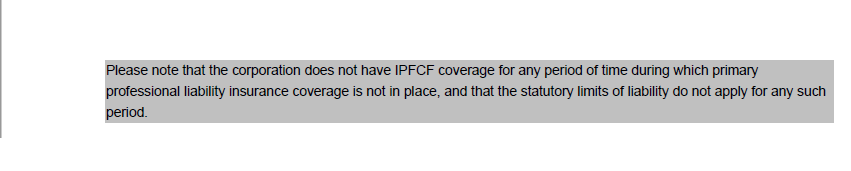
In older versions, the code above would fail to wrap the line properly:

However, in version 7.2.5 the above behavior was fixed and the line is now wrapped correctly:
Resources