
What is Grid Layout?
CSS Grid layout is a powerful tool that allows for two-dimensional layouts to be created on the web. CSS grid is currently not an official standard (it is a W3C Candidate Recommendation,) although it has been adopted by the recent versions of all current major browsers.
For more information, see the following links:
Why Does iText Need Grid Layout?
One of iText Core’s most popular add-ons is pdfHTML, which parses HTML/CSS and converts them to PDF. Creating PDFs from templates is a very common use case, and pdfHTML was developed specifically for this. It offers much more in terms of customization and CSS support compared to iText 5’s XML Worker, including direct generation of PDF/A and PDF/UA documents from templates.
We actually registered the first customer request for CSS Grid support sometime in late 2019, though the feature has only recently begun to be more widely used. According to research by the HTTP Archive, CSS Grid usage roughly doubled each year between 2019 and 2022—from 2% to 4%, 8% and now 12% according to the latest data—so adding support for this feature was only a matter of time from our side.
Since many existing layout frameworks are based on implementations of the CSS Flexible box layout module, this may be the reason for the relatively slow adoption of Grid Layout on the Web. However, CSS Grid is an extremely convenient way to create paginated printable HTML because of how it is defined.
With all that in mind then, Grid Layout support was a natural fit for pdfHTML. In the middle of 2024, we released pdfHTML 5.0.5 which introduced support for the majority of the CSS Grid features, as detailed below.
Designing Our Proof of Concept Implementation
We had recent experience in supporting complex CSS features like the Flexbox and Multi-column layout modules, so we could quickly begin working on a PoC implementation.
Under the hood, pdfHTML makes heavy use of iText Core’s layout module to render HTML elements. Therefore, we decided to put the main Grid Layout logic directly into the layout module, so that it can also be available for greater fine-tuning of created documents in the future without necessarily using pdfHTML.
Technically, it’s already possible to use this feature directly from the layout module, although the API is not so user-friendly as yet. This can be improved at a later point as we gauge user interest.
As a base for the Grid implementation we decided to use com.itextpdf.layout.renderer.BlockRenderer (Java/.NET) which was designed to lay out and draw block elements. But you can also pass an exact rectangle to fit an element into. The BlockRenderer also takes care of a lot of properties like margins, paddings, borders, background etc. So the idea is that we do all pre-calculations according to Grid placement algorithm and Grid sizing algorithm and then feed the results to BlockRenderer to render.
From pdfHTML’s side, it is responsible for parsing CSS Grid related properties and converting them into layout module grid properties. Some properties are pretty complex to resolve, so pdfHTML is not simply a proxy for the iText Core layout API; it also takes responsibility for handling grid areas and named grid lines.
Technical Details
Layout Algorithm
In general, the layout algorithm works as follows:
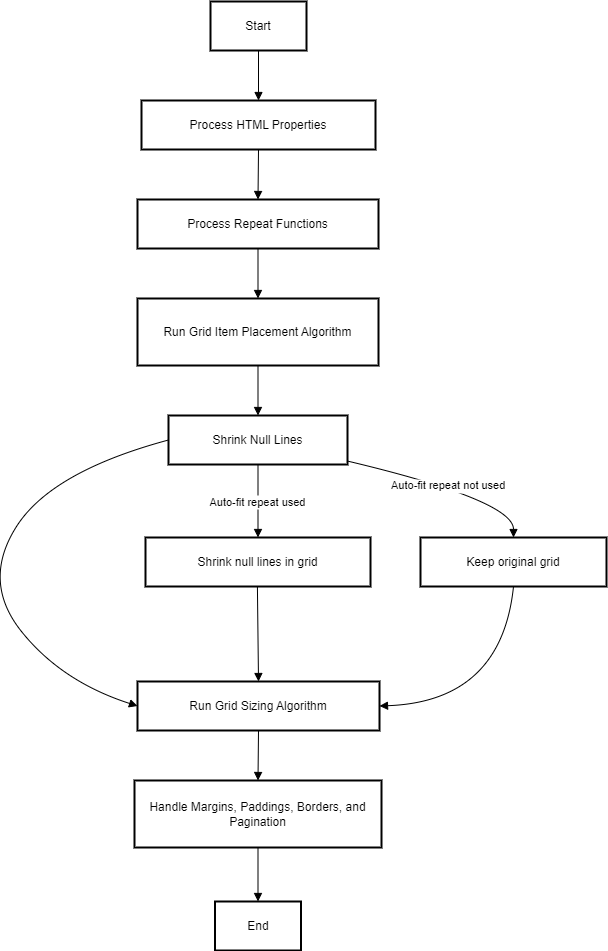
Since iText is a PDF library, for our implementation we needed to address a challenge that web browsers don’t have to concern themselves with: splitting content across multiple pages.
Our Page Splitting Algorithm
When converting HTML to PDF, one of the most important questions is how content should be split between pages. The draft specification does not clearly define a fragmentation algorithm, so we aimed to mimic the behavior of web browsers when printing.
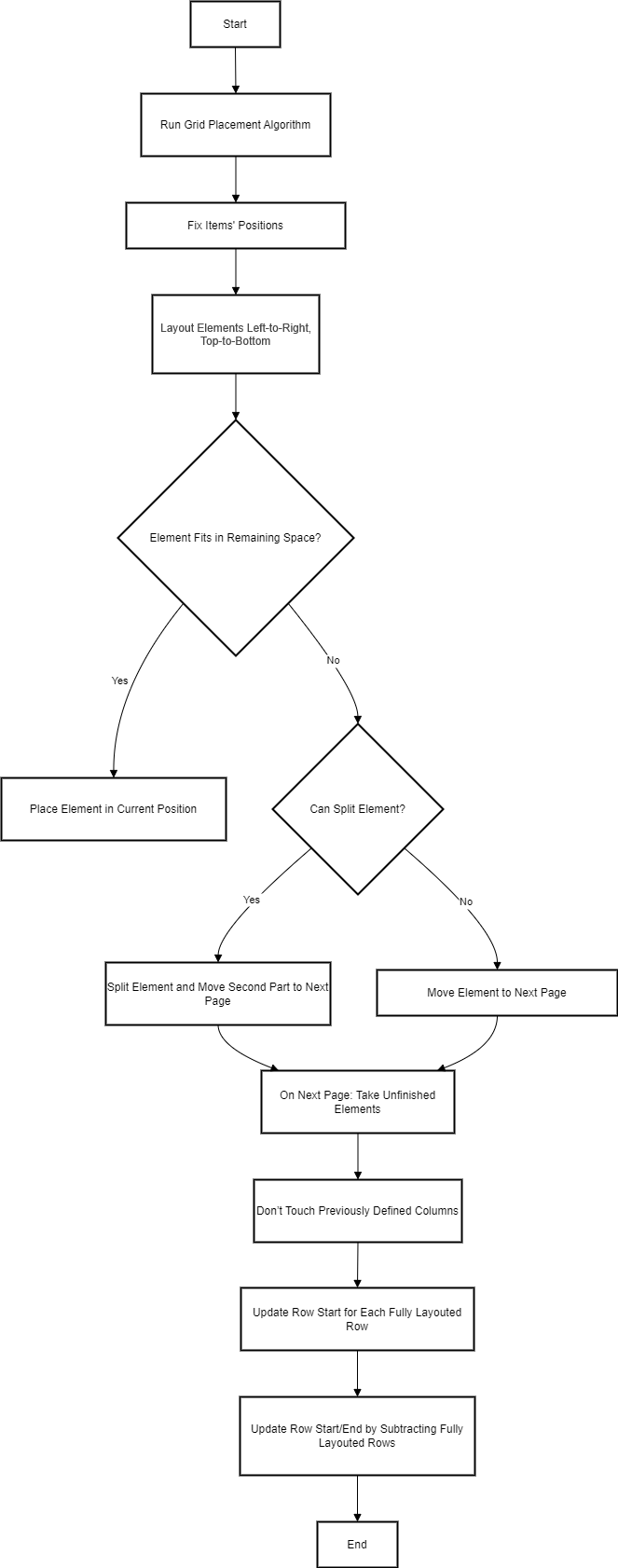
Our algorithm is approximately the following:
-
Run the algorithm for grid placement and do all the calculations for grid sizing, without taking into account page breaks.
-
Fix item positions within the calculated rows/columns of the grid so they are not reshuffled on the following page(s).
-
We lay elements out left-to-right, and top-to-bottom.
-
If we find an element which cannot fit into the remaining space on the page we either:
-
move the element to the next page or,
-
if we can, split the element into 2 parts and move the 2nd part to the next page.
-
-
-
On the following page, we take the remaining elements to lay out and we:
-
Don’t touch the columns defined previously.
-
Update the row-start by incrementing it for each fully laid out row for the element.
-
Update the row-start/end by subtracting the amount of fully laid out rows.
-
-
Repeat the layout process for any remaining elements, until all elements are placed.
Testing our Implementation
For each created ticket we also wrote tests. By the end we had 386 tests, but they were quite synthetic because each test covered some particular properties or logic. Nearer to the end of grid development we added the W3C Grid Layout Test Suite to our pdfHTML module, to check how our implementation works for real HTML using Grid Layout.
This step allowed us to find some critical issues which caused infinite loops or null pointer exceptions, and resolve them before release.
Grid Sizing Algorithm Implementation
At first, we started writing our own Grid sizing algorithm but discovered the specification doesn’t fully clarify or define some details of the algorithm. As a result, we realized in the middle of development that we couldn't complete our implementation while achieving the same result as in browsers.
We then decided to look at how particular situations are implemented in Chromium (since it’s open-sourced). However, we found Chromium’s implementation is wildly different from the algorithm in the specification, so it was impossible to simply take the parts we were interested in and leave the rest.
As a result, we decided to take Chromium's grid sizing algorithm almost completely and rewrite it in Java. To ensure correct attribution of the code we put it into a separate class, and added the Chromium copyright notice.
However, there is a part of our algorithm which was written completely by ourselves—resolving repeat functions. These are frequently used in templates, and when using it with ‘'auto-fit’' or ‘'auto-fill” we perform special calculations for these cases to determine how big templates should be, and how much “repeat“ should be repeated to not exceed the available area.
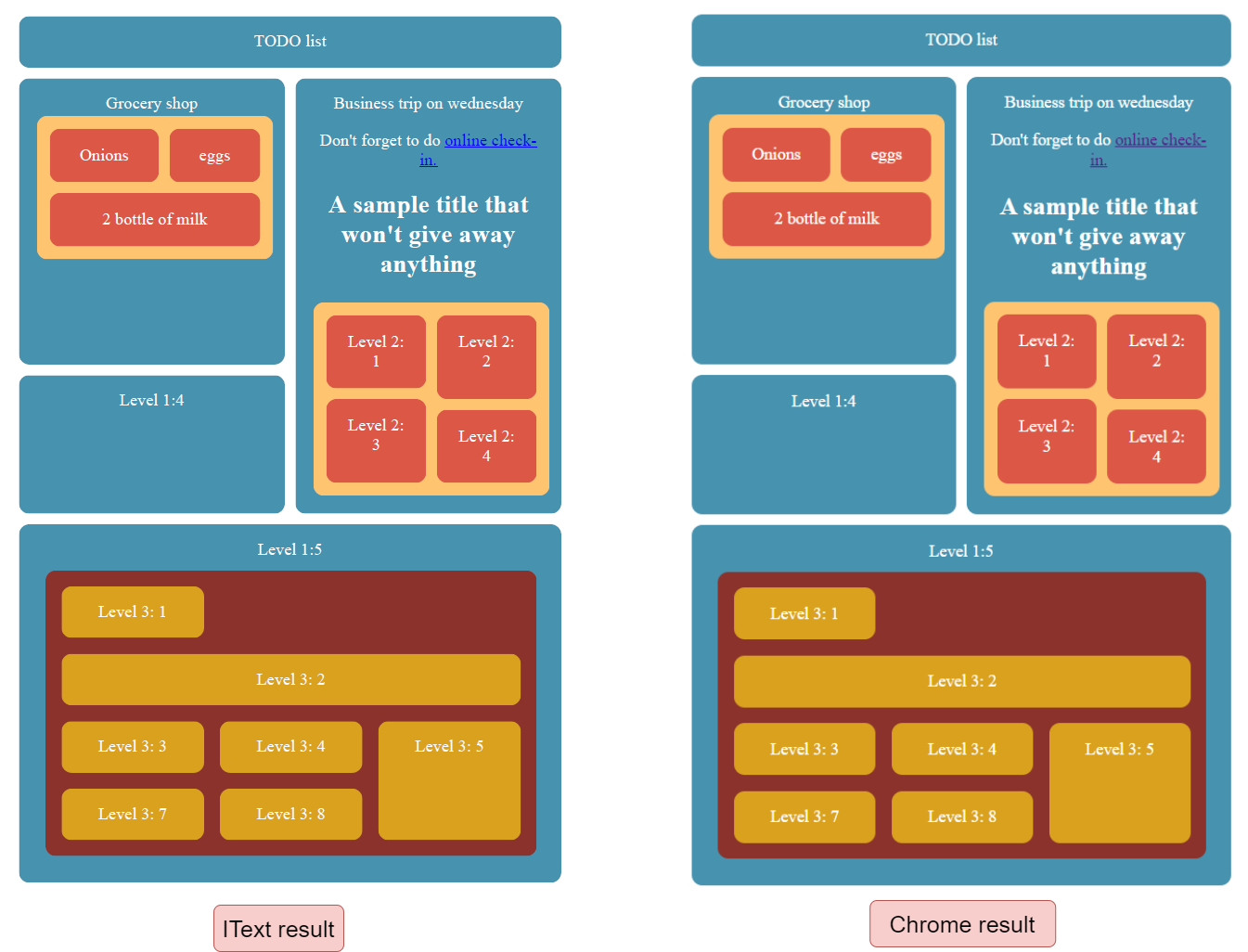
complex_example
Grid Placement Algorithm Implementation
As for the placement algorithm, this was all our own work. Again, the specification was unclear about many details when it came to handling the correct placement of grid items. Still, our implementation of this algorithm went quite smoothly and we were able to achieve the same result as in browsers, except for some cases when elements overlapped.
The most challenging part was implementing negative indices for grid elements as the logic for this was quite complex, and there is only a relatively brief explanation in the specification. However, we found it is similar to how string slices/indexing works in Python.
Limitations of the Current Implementation
Elements to the Right of the Visible Page are Not Rendered
If your grid cannot fit onto a page horizontally, some elements on the right might be not visible. The behavior is similar to the browser’s behavior when it’s resized to not have enough horizontal space for all the elements.
Currently Unsupported Grid Features
Our implementation in pdfHTML 5.0.5 which corresponds to iText Core version 8.0.5 doesn’t support (or rather, ignores) the inline-grid value of the display property and subgrid value for grid-template-columns and grid-template-rows properties.
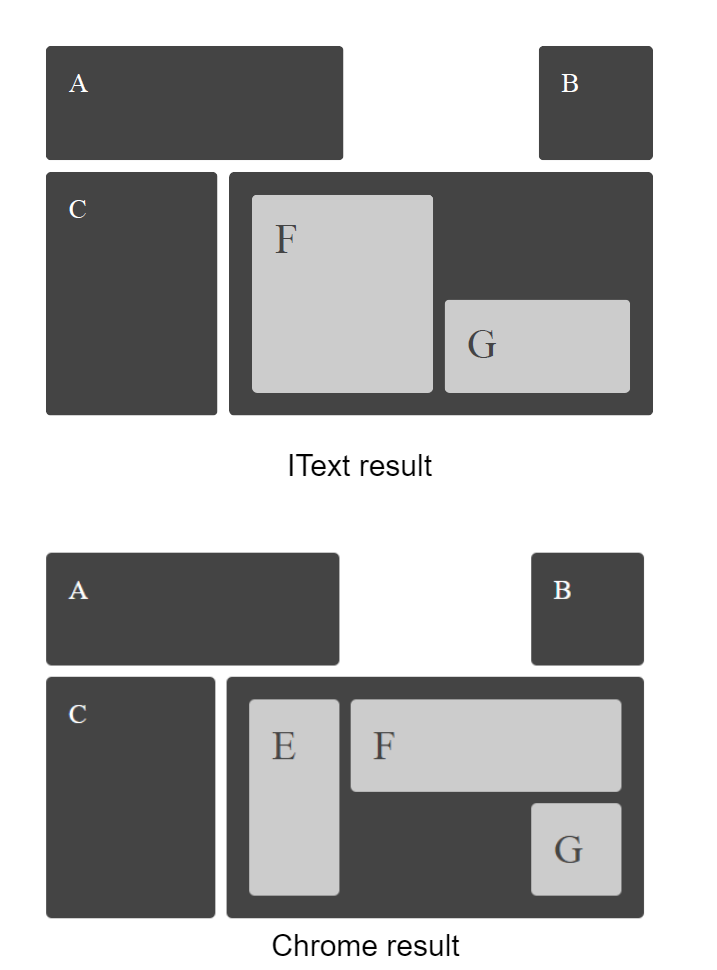
linenames_test shows subgrid value is not yet supported
These are quite challenging to implement, and the effort seems to not be worth it—at least for now. From consulting the HTTP Archive’s state of the web report, we found that the subgrid value is rarely used (fractions of a percent). Therefore, we decided to postpone implementing these features.
There are also some other properties not exclusive to the Grid Layout module itself which are not properly supported, like justify-* properties. But even without a proper 1-to-1 support for them as per the documentation, the results are still good and improving it further is not a priority right now.
Examples
The following files are the source files for the images in this article.
For a Java and C# code sample demonstrating Grid Layout usage, you can refer to this dedicated example from the pdfHTML 5.0.5 release. Along with the code samples, you’ll also find more details on the main supported properties in our implementation.
|
Written by |
Dmitry Radchuk, Software Engineer, iText SDK
|
|---|