
The problem is that the chart image is too big for the cell.
These charts look like this:

vulnerabilityDetailsTable.AddCell(new PdfPCell(img) { Border = PdfPCell.RIGHT_BORDER, BorderColor = new BaseColor(79, 129, 189), BorderWidth = 1, Padding = 5, MinimumHeight = 30, PaddingTop = 10 }); }
The problem is that the chart image is too big for the cell and I obtain this horrible result:
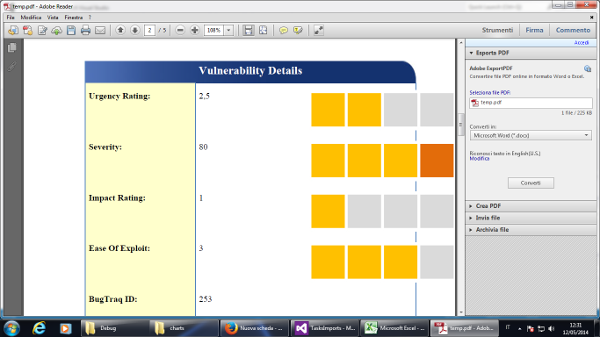
So I have the following 2 questions:
-
Can I resize the
Imagesize into my code or do I have to do this with an image editor? If it's possible, where do have I to do this? Right after I load the image or when I put the image into my PDF table cell? -
When I look at the image using my Windows Photo Viewer at 100% of the size, I see it much smaller than in the PDF. Why is this?
Posted on StackOverflow on Mar 12, 2014 by Andrea Nobili
There are different strategies for adding an Image to a PdfPCell.
You are using this:
// we wrap he image in a PdfPCell PdfPCell cell = new PdfPCell(img[0]); table.AddCell(cell);
As documented, this option doesn't scale the image (which is what you want). If you want to scale the image, you could use this:
// we wrap the image in a PdfPCell and let iText scale it cell = new PdfPCell(img[1], true); table.AddCell(cell);
By adding the boolean parameter true, you ask iText to scale the image.
Another option is to use addCell() like this:
// we add the image with addCell() table.AddCell(img[2]);
This will also scale the image, but use the properties of the default cell. If you don't change these properties, there will be a padding of 2 user units.
You also have the option to use composite mode:
cell = new PdfPCell(); cell.AddElement(img[3]); table.AddCell(cell);
This will make sure the image is scaled to fill 100 percent of the cell width, unless you change the width percentage of the image, for instance:
img[3].WidthPercentage = 50;
This line will make sure that the width of the image is 50% of the available width of the cell.
Color charts