
I have a series of list in this list:
private List<List<String>> tableOverallList;
This object contains 8 values in each list. I need to place it in the table created. I would like to have 2 Rows with 8 columns:
String[] tableTitleList = {" Title", " (Re)set", " Obs", " Mean", " Std.Dev", " Min", " Max", "Unit"}; List<String> tabTitleList = Arrays.asList(tableTitleList);
Please help me to place the 1st list of values inside the List tableOverallList in the 2nd Row. I will try managing with the rest of the list.
PdfPTable table = new PdfPTable(3); // 3 columns. PdfPCell cell1 = new PdfPCell(new Paragraph("Cell 1")); PdfPCell cell2 = new PdfPCell(new Paragraph("Cell 2")); PdfPCell cell3 = new PdfPCell(new Paragraph("Cell 3")); PdfPCell cell4 = new PdfPCell(new Paragraph("Cell 4")); PdfPCell cell5 = new PdfPCell(new Paragraph("Cell 5")); PdfPCell cell6 = new PdfPCell(new Paragraph("Cell 6")); PdfPCell cell7 = new PdfPCell(new Paragraph("Cell 7")); PdfPCell cell8 = new PdfPCell(new Paragraph("Cell 8")); table.addCell(cell1); table.addCell(cell2); table.addCell(cell3); table.addCell(cell4); table.addCell(cell5); table.addCell(cell6); table.addCell(cell7); table.addCell(cell8); document.add(table);
Posted on StackOverflow on Jun 25, 2014 by srinivasan
That's really easy. So you have data in a nested list. For instance:
public List<List<String>> getData() { List<List<String>> data = new ArrayList<List<String>>(); String[] tableTitleList = {" Title", " (Re)set", " Obs", " Mean", " Std.Dev", " Min", " Max", "Unit"}; data.add(Arrays.asList(tableTitleList)); for (int i = 0; i < 10; ) { List<String> dataLine = new ArrayList<String>(); i++; for (int j = 0; j < tableTitleList.length; j++) { dataLine.add(tableTitleList[j] + " " + i); } data.add(dataLine); } return data; }
This will return a set of data where the first record is a title row and the following 10 rows contain mock-up data. It is assumed that this is data you have.
Now when you want to render this data in a table, you do this:
PdfPTable table = new PdfPTable(8); table.setWidthPercentage(100); List<List<String>> dataset = getData(); for (List<String> record : dataset) { for (String field : record) { table.addCell(field); } } document.add(table);
The result will look like this:
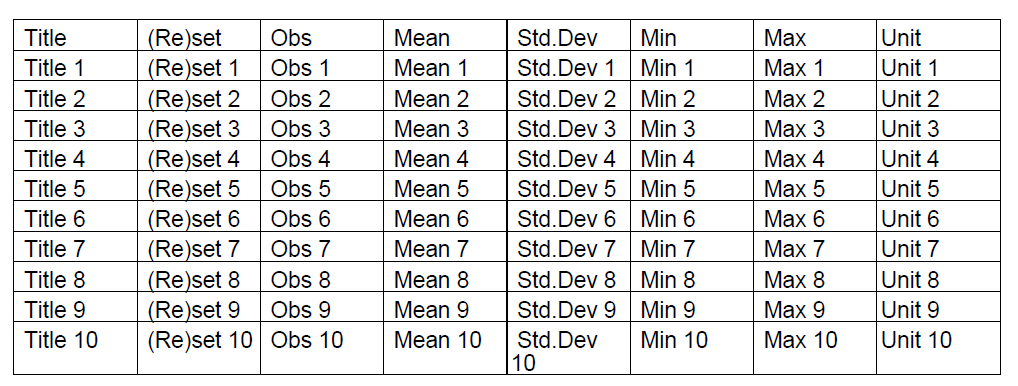
Resulting table
You can find the full source code here: ArrayToTable and this is the resulting PDF: array_to_table.pdf
If you only want 2 rows, a title row and a data row, change the following line:
for (int i = 0; i < 10; ) {
Into this:
for (int i = 0; i < 2; ) {
I've provided a more generic solution because it's more elegant to have generic code.
Click this link if you want to see how to answer this in iText 7.