
I need help creating a nested table in iText.
How can I create a table that looks like the table in the following screen shot:
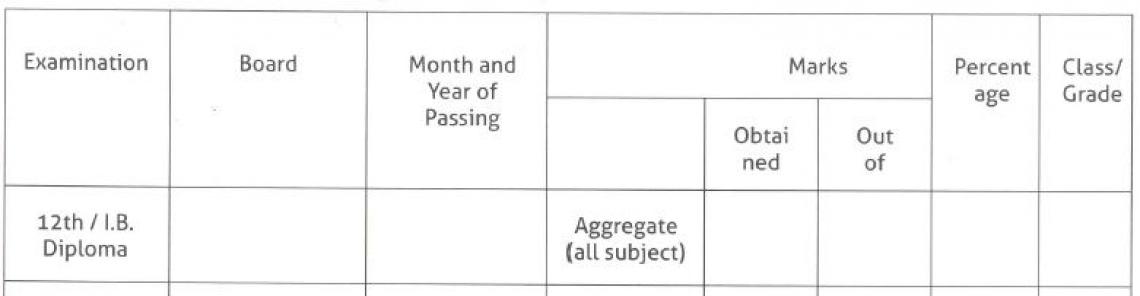
This is my code so far:
var subTable2 = new PdfPTable(new float[] { 100, 100, 100, 100, 100, 100,100,100 }); subTable2.TotalWidth = 510f; subTable2.LockedWidth = true; subTable2.DefaultCell.HorizontalAlignment = Element.ALIGN_CENTER; subTable2.AddCell(new Phrase("Examination", time51)); subTable2.DefaultCell.HorizontalAlignment = Element.ALIGN_CENTER; subTable2.AddCell(new Phrase("Board", time51)); subTable2.DefaultCell.HorizontalAlignment = Element.ALIGN_CENTER; subTable2.AddCell(new Phrase("Month and Year of Passing", time51)); subTable2.DefaultCell.HorizontalAlignment = Element.ALIGN_CENTER; subTable2.AddCell(new PdfPCell(new Phrase("Mark", time51))); PdfPTable nested = new PdfPTable(1); nested.AddCell(""); nested.AddCell("Obtained"); nested.AddCell("Out of"); PdfPCell nesthousing = new PdfPCell(nested); nesthousing.Padding = 0f; subTable2.AddCell(nesthousing); subTable2.DefaultCell.HorizontalAlignment = Element.ALIGN_CENTER; subTable2.AddCell(new Phrase("Percentage", time51)); subTable2.DefaultCell.HorizontalAlignment = Element.ALIGN_CENTER; subTable2.AddCell(new Phrase("Calss/Grade", time51)); doc.Add(subTable2);
Posted on StackOverflow on
Jul 7, 2015
by
Semil Sebastian
Please take a look at SimpleTable12. It creates a table that looks like this: simple_table12.pdf
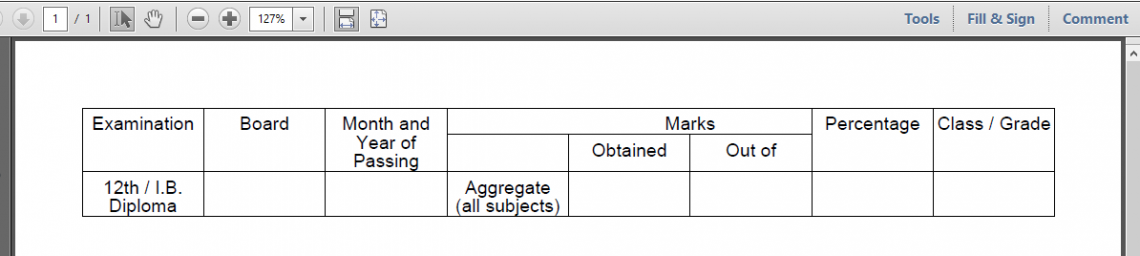
Table example
You could still fine-tune the height of the cells by using a padding or by introducing descender/ascender info, but those are details. What matters is: how to organize the cells?
I've written this small convenience method:
public PdfPCell createCell(String content, int colspan, int rowspan, int border) { PdfPCell cell = new PdfPCell(new Phrase(content, font)); cell.setColspan(colspan); cell.setRowspan(rowspan); cell.setBorder(border); cell.setHorizontalAlignment(Element.ALIGN_CENTER); return cell; }
You pass some content, a colspan, a rowspan and border info and it creates you the PdfPCell you need. This allows us to create code that is easier to read:
public void createPdf(String dest) throws IOException, DocumentException { font = new Font(FontFamily.HELVETICA, 10); Document document = new Document(); PdfWriter.getInstance(document, new FileOutputStream(dest)); document.open(); PdfPTable table = new PdfPTable(8); table.setWidthPercentage(100); table.addCell(createCell("Examination", 1, 2, PdfPCell.BOX)); table.addCell(createCell("Board", 1, 2, PdfPCell.BOX)); table.addCell(createCell("Month and Year of Passing", 1, 2, PdfPCell.BOX)); table.addCell(createCell("", 1, 1, PdfPCell.TOP)); table.addCell(createCell("Marks", 2, 1, PdfPCell.TOP)); table.addCell(createCell("Percentage", 1, 2, PdfPCell.BOX)); table.addCell(createCell("Class / Grade", 1, 2, PdfPCell.BOX)); table.addCell(createCell("", 1, 1, PdfPCell.BOX)); table.addCell(createCell("Obtained", 1, 1, PdfPCell.BOX)); table.addCell(createCell("Out of", 1, 1, PdfPCell.BOX)); table.addCell(createCell("12th / I.B. Diploma", 1, 1, PdfPCell.BOX)); table.addCell(createCell("", 1, 1, PdfPCell.BOX)); table.addCell(createCell("", 1, 1, PdfPCell.BOX)); table.addCell(createCell("Aggregate (all subjects)", 1, 1, PdfPCell.BOX)); table.addCell(createCell("", 1, 1, PdfPCell.BOX)); table.addCell(createCell("", 1, 1, PdfPCell.BOX)); table.addCell(createCell("", 1, 1, PdfPCell.BOX)); table.addCell(createCell("", 1, 1, PdfPCell.BOX)); document.add(table); document.close(); }
As you can see, it's a matter of calculating the correct colspan and rowspan values, and applying the correct borders.